My Flight is Not Profitable for AirTran Airways

AirTran Airways

AirTran Airways

It is true.  Flights are incredibly cheap right now.  Today I purchased a nonstop flight to Orlando, Florida from Baltimore, Maryland for $54.00 before fees and taxes from AirTran Airways. The return trip costs the same amount.  This seemed incredibly cheap to me so I decided to do some research and see if they are actually making any money from me.  It turns out that the airline reports their CASM (Cost per Available Seat Mile) on their accounting balance sheet for the year.  The most recent CASM is 11.43 cents with all fuel costs.  I did a quick search on the distance from Baltimore to Orlando and came up with 790 miles.

$00.1143 * 790 = $90.297

So It turns out that my $54.00 flight actually costs AirTran $36.30 more than I paid. I had expected this at that price.  This does not mean the flight will not be profitable as this is just what I paid and not what the total revenue minus expenses is for that flight segment.  It’s time to get to the skies!

Share This:
  • Digg
  • Sphinn
  • del.icio.us
  • Facebook
  • Mixx
  • Slashdot
  • Google
  • Tipd
  • TwitThis

Do Not Waste Your Time Delivering Phone Books

Five Cent Nickel’s most recent article, “33 Ways to Earn Extra Money” reminded me of a time when I was home from college during winter break and tried to earn extra money delivering phone books.  It was one of those newspaper ads that sounded too good to be true.  I could earn a couple hundred extra bucks delivering phone books during my time off.  This turned out to be disastrous.

Phone Books on the Street

Phone Books on the Street

First off, let me point out that my hometown is outside of Cleveland, Ohio right in the middle of the Lake (Erie) Effect Snowbelt.  It is not uncommon for it to snow 2-3 feet overnight in December.  At the time, I also drove a 1991 Ford Probe.  So the deal was that everyone who wanted to deliver phone books would meet at this location and pick up a route or two.  So being young and naive, I wanted to earn the most money possible and I went with two routes.  This turned out to be a couple thousand phone books loaded into a Ford Probe!  It was definitely over the maximum weight capacity, but I was not going to ask them to unload any at this point.

To make matters worse, each one of the phone books had to be individually stuffed into a clear plastic bag.  This does not sound too bad as it can be done while watching television, but it really was a huge pain that took more time than it was worth.  Think of the process, unload the car, bring the books into the living room, stuff into bags, repeat a thousand times and load the car back up.   I guess there is a possibility for some process improvement here, but this was before I had taken any classes in manufacturing or process improvement.  This was not even the worst part in the whole deal.

The hardest part was that the phone books had to be delivered to the front porch/steps of EVERY residence. This equated to parking the car full of phone books and walking up and down every driveway or driving up and down the driveways.  Neither of these options were easy. I’d say it took three minutes on average to deliver each book. At the time, it paid between ten and twenty cents per phone book delivered. At roughly twenty books an hour at twenty cents a book that is only $4.00/hour! That does not even figure in expenses such as gas money or wear and tear on the vehicle.  The profit would be significantly less.

It did not help that I was delivering these phone books in the middle of the winter after a recent snow storm left a couple feet of snow on the ground.  More than once, I got stuck trying to get up peoples driveways with a car full of phone books.  It also did not work well to try and walk since I lived in a semi-rural area where almost all the driveways are at least 100 ft long.  It was even worse to try to follow the houses parallel to the road and trudge through the snow door to door.  In the end, I gave up and returned the phone books. The company did not even pay me for the books I did deliver.

I do realize this scenario might be a bit different in other areas and climates, but I know for sure I’ll never waste my time with it again.  Even a phone book every minute at twenty cents a book, that would only be $12/hour.  I made more than that busing tables at the local restaurant.

Share This:
  • Digg
  • Sphinn
  • del.icio.us
  • Facebook
  • Mixx
  • Slashdot
  • Google
  • Tipd
  • TwitThis

Computer Upgrades < $100

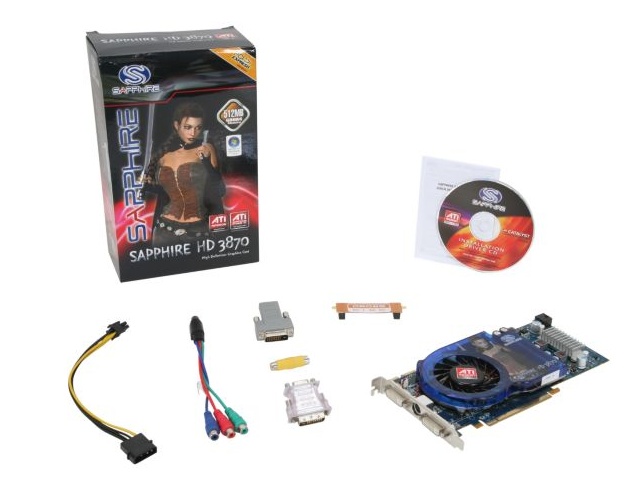
I started researching to upgrade my computer last March and then I got distracted by outside summertime fun.  It’s actually pretty old for today’s standards (AMD Athlon 64 3200+) but I cannot justify spending the money to build a completely new system right now.  I figured I would just throw a bit more life into it with a new video card, more RAM and probably a clean install of XP 32bit or Vista.  I will definitely be staying away from XP 64bit as barely any hardware (Zune, Digital Camera, etc) I own works with it!

Sapphire HD 3870 - Contents in Box - Picture from newegg.com

The long term plan is to buy a laptop and then convert the desktop into a media center and file server for the living room.  However, I still need to buy a HDTV for this to really be worth my time.  Deciding what video card to purchase was a very challenging decision as many brands and options currently exist.  At first I was only looking at fan-less video cards, then it was the newer line of the ATI HD cards.  In the end I read these articles Can Your Old Athlon 64 Still Game? and Best Cards for the Money – Oct ‘08 from Tom’s Hardware Guide and decided on the ATI HD 3870 card.  This was mainly due to the 55nm process, less power consumption, supposed ability to play Blu-ray without being CPU intensive and finally it was a good price on Newegg.  The HD 4850 was also researched as an option, but would be overkill for my processor and my gaming needs.  (My favorite game is Sim City 4, although I plan on trying out some more advanced first person shooters when I get the new video card)  I’ll run some benchmarks after I get up and running.

Share This:
  • Digg
  • Sphinn
  • del.icio.us
  • Facebook
  • Mixx
  • Slashdot
  • Google
  • Tipd
  • TwitThis

Chipotle Cilantro Lime Rice Recipe Leaked

Chipotle Burrito

I love Chipotle and I love their rice.  While browsing the internet to try to figure out how many calories a Chipotle burrito has I stumbled across a posting with the ingredients for the cilantro-lime rice.  The full batch ingredients are as follow:

Chipotle Cilantro Lime Rice

  • 12 pounds of rice (uncooked)
  • 3 cups soybean oil
  • 1 cup fresh cilantro
  • 2 Tablespoons salt
  • 1/2 cup lime juice

Directions: Cook rice as package states, add the rest of the ingredients.

Pretty simple, but oh so yummy.  Now you ask, when will I ever need 12 uncooked pounds of rice?  I guess that is a bit much, so here it is divided by 27.43  (12lbs = 192oz/7 oz per cup = 27.43 cups) for a more reasonable amount.

Normal Serving Size of Chipotle Cilantro Lime Rice

  • 1 cup of rice (uncooked, about 7 oz)
  • 2 Tablespoons soybean oil (okay, it’s technically 1.75 US Tablespoons)
  • 2 teaspoons fresh cilantro (1.75 US teaspoons)
  • Dash of Salt (.22 US teaspoons)
  • 1 teaspoon of lime juice (.875 US teaspoons)

Directions: Cook rice as package states, add the rest of the ingredients.

So there you go, now I want Chipotle.  Anyone else have any of their other recipes?  Oh by the way, they do not officially post their nutrition content, but most people estimate 800-1200 calories depending on what is ordered and the quantity delivered during assembly.

Share This:
  • Digg
  • Sphinn
  • del.icio.us
  • Facebook
  • Mixx
  • Slashdot
  • Google
  • Tipd
  • TwitThis

Get Rich Slowly Tips, Tricks and More

This past spring, I opened up a brokerage account with Banc of America Investment Services since I have the majority of my money in Bank of America deposit accounts.  The advantage here is next day transfers between accounts when most other services take multiple days.  They also currently offer 30 free trades a month if you have $25,000 in deposit accounts (Checking, Savings, CDs).  If not, the rates progressively decrease depending on what kind of checking account you have established.

Since then I have poured over many different documents from MSN Money, Google Finance, Motley Fool and many others.  After all this, I was left feeling like all the information I read was written by experts and was not real life experiences.  This is when I ventured off to look for some blogs to read about personal non professional experiences.  The following blogs I have been reading off and on for a few months:

Money Blogs

  • Five Cent Nickel – Decent tips and personal experiences for everyday personal finances.  The great deals for credit cards and savings accounts are always highlighted on the right.
  • Get Rich Slowly – “personal finance that makes cents” is the tag line and is all about sensible personal finance.  Really good tips that followed his journey to becoming debt free.
  • The Rich Canadian – The RC is a different approach from the above blogs.  He freely posts his net worth and claims to be richer than most people reading his blog.  There’s an even more interesting twist with reviews about energy drinks.
  • My Money Blog – Decent site about saving money and investing with an overall goal of $1million net worth by age 45.

One interesting point to make about all of these making money blogs is they all offer up some sort of ad system to boost their networth.  So that’s that for now.  I’ve added a link list to the sidebar to track these sites more easily.  I’ve also added the categories Life and Money as a few new topics to blog about.

Share This:
  • Digg
  • Sphinn
  • del.icio.us
  • Facebook
  • Mixx
  • Slashdot
  • Google
  • Tipd
  • TwitThis

XOHM WiMax in Baltimore

Sprint’s next generation (4G) network XOHM WiMax Broadband network claims they are set out to revolutionize the way we connect by allowing the same kind of connection at home and on the go.  I don’t believe they are too far off from this claim.  However, I would hold out on the mobile devices until the 3G and 4G devices are available so it will be possible to connect in other cities where XOHM is not available yet, from the Press Release:

Sprint will be the first and only wireless carrier to launch a dual-mode 3G – 4G access device expected later in the fourth quarter. This device will extend Sprint’s mobile broadband leadership by offering the power of the NOW network — the largest 3G data network in the U.S. — with the fastest data speeds among all national carriers available on this new 4G network in Baltimore and in future markets.

I recently saw the XOHM kiosk’s at the Fells Point Fun Festival in Baltimore and briefly played with the Nokia 810 connected to the WiMax network.  It worked as expected and browsed to all the pages I went to with out delay.  I wish I could justify the cost for one of the Nokia 810s.  I overheard one of the guys working the stand talking about the speed tests they had been trying on the laptops all day.  From what I heard he said some have been slower than advertised and some have been decently faster than the stated, “We define High Performance level as average 2 – 4 Mbps download speed and 0.5 – 1.5 Mbps upload speed.”

I did not really think about it being a possibility of using this service until I received my recent cable bill and saw my promotional offer of $33/month for a year from Comcast has expired.  It has been raised to $42.95/month.  This is on the border of being too much to pay for internet, even with an advertised 6Mbps+ down.  (I’ve actually been averaging 10Mbps with DSL Reports speed tests.)  XOHM is offering a special until 12/31/2008 for $50/month for 2 devices for the lifetime of the account.  Baltimore, MD XOHM CoverageThis means that it is possible to get a wireless modem to plug into an existing wireless network and an express or usb card for a laptop connection for $50/month!  The individual options are not as good of a deal at $25/month for 6 months and $35/month thereafter for the Home connection.  While, the mobile option by itself is $30/month for 6 months and then $45/month afterward.

I could justify the $7.05 more a month to have a mobile broadband card to use in Baltimore (soon to be in more cities and eventually with 3G networks). The coverage area is currently strong where I live, but does not exist where I work.  I would imagine I could use the mobile broadband card at home and get 2 – 4 Mbps down and 0.5 – 1.5 Mbps up on the laptop  and on the modem connected to the network.  Definitely an intriguing offer to think about.

Share This:
  • Digg
  • Sphinn
  • del.icio.us
  • Facebook
  • Mixx
  • Slashdot
  • Google
  • Tipd
  • TwitThis

Hot Deal on Acer Aspire AS6930-6455 16″ Notebook PC

How good of a deal is the Acer Aspire AS6930-6455 16″ Notebook PC available for $599 until 10/4 at OfficeMax?

Acer Aspire AS6930-6455 16" Notebook PC

Description

  • Intel Core 2 Duo T5800 Processor
  • 16.0″ WXGA Crystal-Bright Display
  • Windows Vista Home Premium OS 64-bit
  • 250GB 5400rpm SATA Hard Drive
  • 4096MB Memory
  • Integrated webcam & microphone
  • 8x SuperMulti DVD Burner
  • Intel WiFi Link 5100 (802.11a/b/g/n WLAN)
  • Intel graphics media accelerator 4500MHD
  • Dolby 8-Optimized Surround Sound with 2 built-in stereo speakers and subwoofer
  • 1-Year Limited warranty

I’ve been keeping an eye out on laptops and trying to figure out what to do with my desktop; either upgrade it and keep using it or turn it into a media center/server and buy a laptop.  My preference is on the last one, but that option is also the most costly.

The big thing with this laptop is it has the new Intel T5800 processor in it that runs at 2.0GHz/800MHz front side bus.  The previous generation processors were the T5750 at 2.0GHz/667MHz and the T5850 at 2.16GHz/667MHz.  So I started my comparison shopping by searching for the processor and finding other models that will be using it.

So far nothing even in the range of $599.99.  The one last thing I decided to do was see if I could build my own Dell and see if the Dell Member Purchase Program would offer a better deal.  Problem, the T5800 processor is not yet available for customizing in a laptop so my builds below are approximate.  One thing that is mandatory for me is wireless N as I just purchased the Dlink Gigabyte Wireless N Router. The images go to the complete PDF summary of each build.

Dell Inspiron 1525

Dell Inspiron 1525 – $884 – Intel T5850, 4GB RAM, 250GB Hard Drive, Wireless N, 15.4″ display

Dell Studio 15

Dell Studio 15 – $924 – Intel T5850, 4GB RAM, 250GB Hard Drive, Wireless N, 15.4″ display

So the final verdict seems to be that the OfficeMax price on the Acer Aspire is the best deal for a laptop in its class right now.  My only major complaint might be that the 16″ display, while still at 1280 x 800 pixels makes the laptop a little larger than a 15.4″ without really giving more screen realestate.  It also comes in at a pretty hefty 7.49lbs which is about 1lb heavier than most in its size.  I’m going to have to give this one some thought.

Share This:
  • Digg
  • Sphinn
  • del.icio.us
  • Facebook
  • Mixx
  • Slashdot
  • Google
  • Tipd
  • TwitThis

« Previous PageNext Page »